Posts

Set proxy for linux terminal connection

Cent OS HTTP proxy can be configured in different ways 1. Terminal Session Configuring HTTP proxy for terminal can be achieved by setting proxy values using terminal. These will be application for a particular session. Setting will be cleared once the session closed from client Export the below variables in terminal for setting proxy with out authentication export http_proxy = 'http://proxyserveraddress:port' export https_proxy = 'https://proxyserveraddress:port' Common port number used for HTTP proxy is 3128.  User can give either proxy ip address or fully qualified domain name. Disable proxy: Unset the variables, we can remove proxy configuration for session. unset http_proxy unset https_proxy
Fixing TortoiseSVN icons overlay in Windows 10

Image
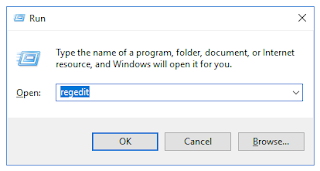
TortoiseSVN icons overlay (Shell icon overlay) may disappear after installing a software which uses same type of icon overlays like OneDrive, Dropbox. Editing the order of overlay icon entries in windows registry can fix the problem. These screen shorts are from a windows 10 desktop with OneDrive and Dropbox. Step 1. Start Registry editor using run window Step 2. Backup registry to disk. Step 3. Go to following location in registry HKEY_LOCAL_MACHINE\SOFTWARE\Microsoft\Windows\CurrentVersion\Explorer\ShellIconOverlayIdentifiers Step 4 . Rename entries Expanding ShellIconOverlayIdentifiers tree lists all overlay icon entries. Here tortoisesvn icon is displayed after other items (Dropbox). Rename tortoise overlay icon entries by adding more white spaces as a prefix. Items before editing In above example, names sorted in ascending order. Adding white spaces at the beginning of the text will change the order of the entries after a restart. Step 5. Restart and...

Authenticate IIS Web Application Using Application Pool Identity with MSSQL Server

Image
A web application can be connected with MS SQL with application pool identity. While Creating a new web site in IIS, Application pool identity will be the default credential for database connection if the application used windows authentication. These steps enable the application pool to authenticate with MS SQL for all database connections. Screen shots are from a Windows server 2016 Standard with SQL Server Express 14.0. Step 1.  Creating new application pool with desired name. Step 2. Create a website and select the application for the site. Step 3. Connect Sql Server with sql server management studio. Create a new database. Step 4.  Add new sql server user with Application pool name as user name for authentication. The mode of authentication should be Windows Authentication. Select the default database for the user. Step 5. Assign privileges to new user for the database. Step 5. Configure web.conf with windows authentication. Example: <add...