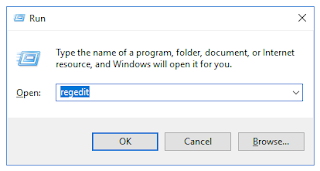
TortoiseSVN icons overlay (Shell icon overlay) may disappear after installing a software which uses same type of icon overlays like OneDrive, Dropbox. Editing the order of overlay icon entries in windows registry can fix the problem. These screen shorts are from a windows 10 desktop with OneDrive and Dropbox. Step 1. Start Registry editor using run window Step 2. Backup registry to disk. Step 3. Go to following location in registry HKEY_LOCAL_MACHINE\SOFTWARE\Microsoft\Windows\CurrentVersion\Explorer\ShellIconOverlayIdentifiers Step 4 . Rename entries Expanding ShellIconOverlayIdentifiers tree lists all overlay icon entries. Here tortoisesvn icon is displayed after other items (Dropbox). Rename tortoise overlay icon entries by adding more white spaces as a prefix. Items before editing In above example, names sorted in ascending order. Adding white spaces at the beginning of the text will change the order of the entries after a restart. Step 5. Restart and...
If the project is using docx as a reference and installed docx package instead of the python-docx it will lead to following error ModuleNotFoundError: No module named 'exceptions' To fix this error install python-docx and remove docx. pip install python-docx To install python-docx package Official Documentation available here: https://pypi.org/project/python-docx/ pip uninstall docx To remove installed docx package
Comments
Post a Comment